
An AI Pipeline for High-Volume Document Processing
Batch AI processing replaced manual, page-by-page digitization — cutting cost per document by 60–70% and running around the clock.
Documents processed per year
Lower processing cost
Continuous automated processing

Overview
Advantage Archives preserves community history — newspapers, rollfilm, magazines and loose documents — and turns it into searchable digital records. The raw material arrives in enormous volume, and every page has to be captured, cleaned up, read and filed.
SparkFire built the AI processing platform that does that work. Archivists upload a folder of scans; the pipeline takes over from there, optimizing each image, extracting the text, and filing the finished records into a searchable library. What used to be handled page by page now runs as unattended batches, around the clock.
Key Takeaways
- Batch processing replaced page-by-page manual handling — the single biggest source of cost and delay.
- An 800,000-document-a-year target moved from unreachable to routine.
- Processing cost per document fell by 60–70%.
- The pipeline runs 24/7, so throughput no longer depends on staffed hours.
- Role-based access keeps a large archive safe to open up to more people.
Challenge
Advantage Archives was processing a heavy, continuous load of documents, rollfilm and magazines almost entirely by hand. Each item was handled individually — scanned, corrected, read, labelled and filed, one at a time, by a person.
That approach does not scale. The work was slow and expensive, throughput was capped by how many hours staff could put in, and the cost per document stayed stubbornly high. Against a goal of 800,000 documents a year, the manual route simply could not get there: adding enough people to close the gap would have cost more than the work was worth.
Strategy
The fix was not to make manual processing faster — it was to stop doing it manually. We designed the system around unattended batches: an archivist hands over a folder, and the pipeline carries it end to end without anyone babysitting each page.
Two principles shaped the build. First, the machine does the repetitive work — image cleanup and text extraction — while people stay in control of what gets processed and how results are reviewed. Second, everything is visible: queue state, per-batch progress and live activity are on screen, so a run that needs attention is obvious without anyone having to open files to check.
Solution & Key Features
- 1
Bulk ingest by the folder, not the page
Archivists upload whole folders rather than individual files, and each batch carries 100–500+ images. This is the step that breaks the one-at-a-time bottleneck: the unit of work becomes a batch, not a page.

Batch upload — the queue accepts whole folders of scans at once. - 2
An AI pipeline that runs itself
Every batch moves through the same automated stages: processing is initiated, images are optimized, text is extracted, and the batch is completed. Each stage reports as it finishes, so a run in progress is legible at a glance — and because nothing waits on a human, batches keep moving overnight and through weekends.

Live pipeline: optimization, then text extraction, then completion — reported per batch. - 3
Real-time throughput dashboard
A single view covers what has been processed, what is queued, and how each batch is doing, alongside live notifications as runs start and finish. Operators manage a high-volume pipeline by exception instead of watching every job.
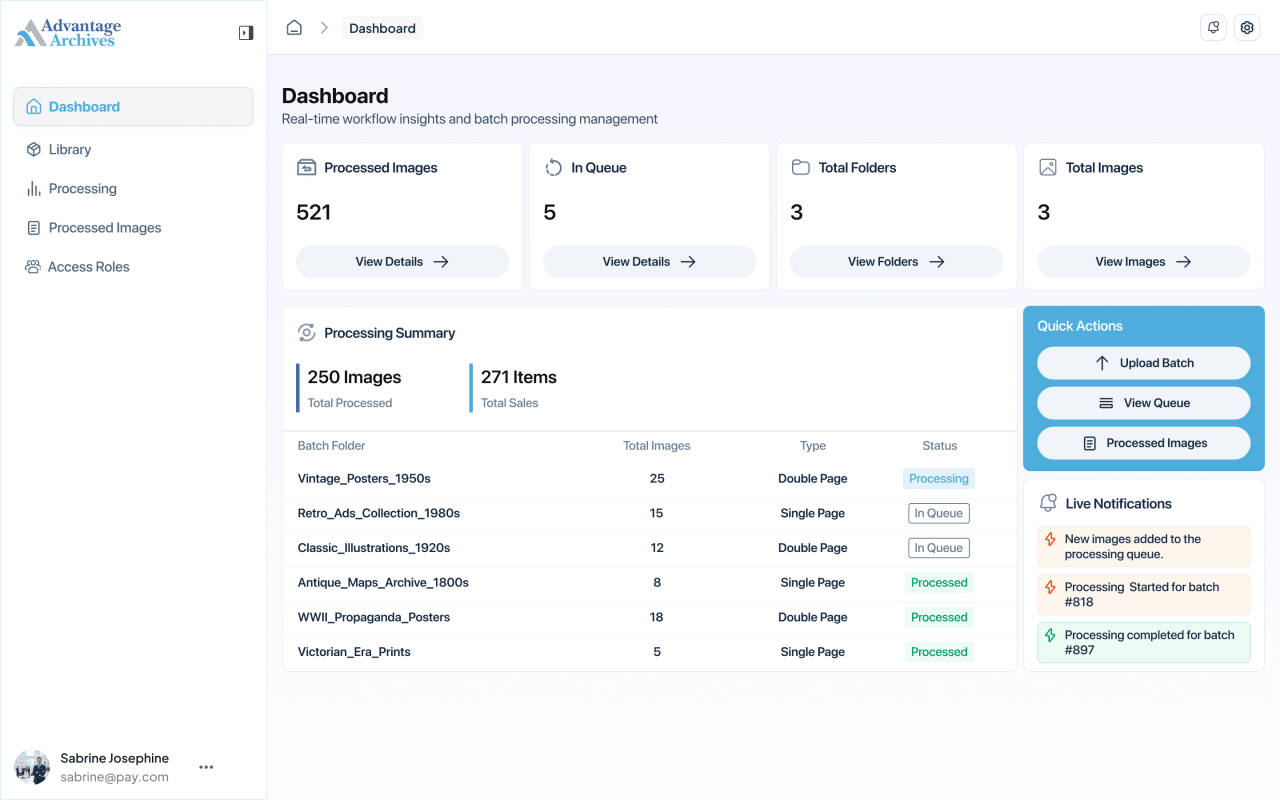
Dashboard — queue depth, batch status and live processing activity. - 4
A searchable library of finished records
Completed batches land in an organized library of folders and collections that can be searched and browsed, so a processed document is actually findable rather than just stored. Originals and processed outputs are both kept.
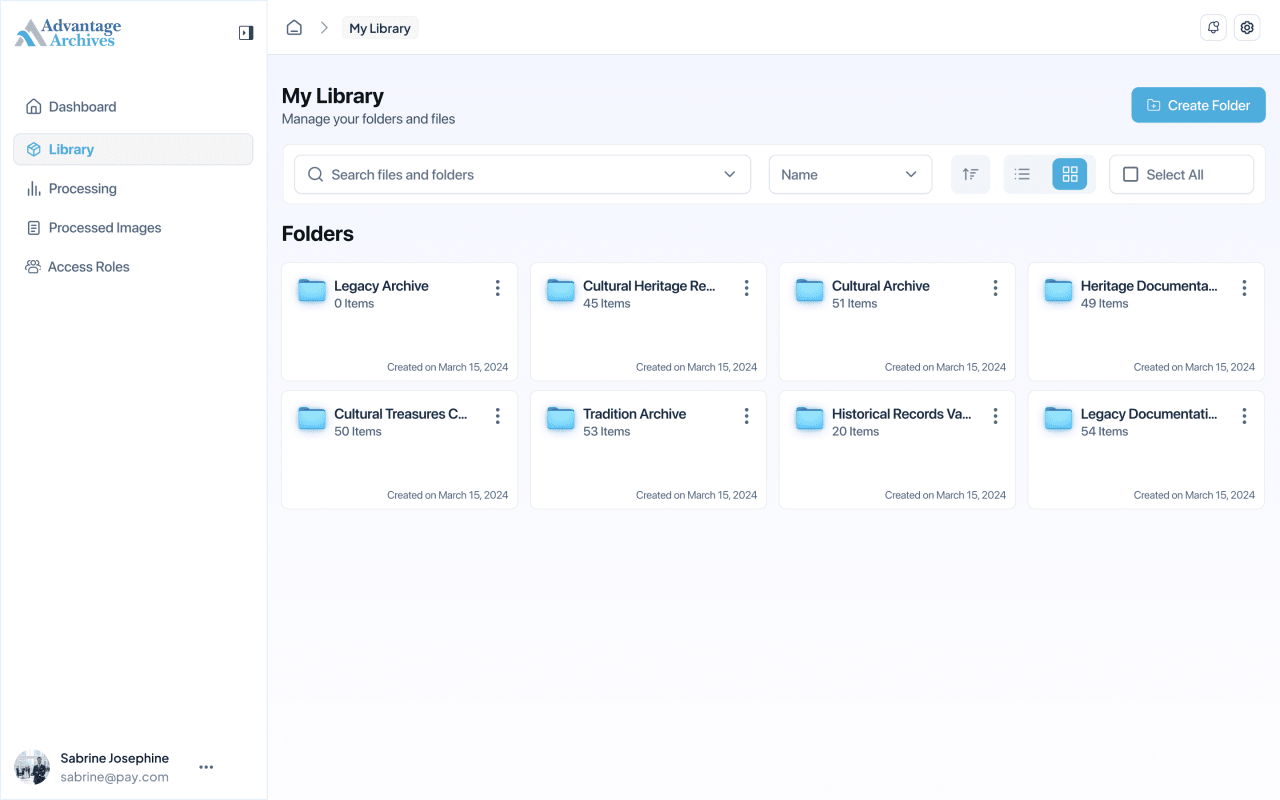
The archive library — processed collections, searchable and browsable. - 5
Role-based access control
Admin, Moderator and Viewer roles govern read and write access across the library, the processing queue and processed images, with a permission matrix showing exactly who can do what. A growing archive can be opened to more people without losing control of it.

Role management — permissions across every module of the platform.
Execution
Discovery & scoping
Mapped the existing manual workflow, the document types in play — documents, rollfilm, magazines — and where the time and cost were actually going.
Pipeline foundation
Built batch ingest and the processing queue so work could be submitted by the folder and run unattended.
AI processing stages
Added image optimization and text extraction, and instrumented each stage so progress is reported per batch.
Library & access control
Shipped the searchable processed-image library and role-based permissions across every module.
Scale & hardening
Tuned throughput and reliability for continuous 24/7 operation at production volume.
Results
- The 800,000-documents-a-year goal is being met — a target that was out of reach with manual processing.
- Processing cost fell 60–70% per document.
- The pipeline runs 24/7, so output no longer depends on staffed hours.
- Results stay accurate and consistent, because every batch goes through the same automated stages instead of varying by operator.
- Staff moved off page-by-page handling and onto oversight and exceptions.
Business Value
The economics of the archive changed. Volume that used to scale with headcount now scales with compute: the same team oversees far more material, at a fraction of the cost per document, without trading away accuracy.
That turns a growing backlog from a liability into throughput. Advantage Archives can take on more collections and commit to volumes that manual processing could never have supported — and the pipeline keeps running long after everyone has gone home.
More client work


Got an idea? Let's make it real.
Tell us about your problem. We'll come back within one business day with a take, a rough plan, and a call invite.